
In the Test Suite form header menu, select the “Test Cases” tab.
All Test Cases of a Test Suite are displayed in a hierarchical structure with folders and subfolders.
-
Test case: Verifies a single behavior or requirement. A test case contains ordered steps; each step includes an action and an expected result.
-
Folders: Use folders to organize test cases by feature, scenario, or component. Subfolders are supported.
The following functions are available in the view.
Toolbar:
-
+ Test Case: Create a Test Case.
-
+ Folder: Create a Folder.
For each Test Case, at the end of a row (incl. context menu):
-
Edit: Open the Test Case in edit mode.
-
Delete: Delete the Test Case.
For each folder, at the end of a row (incl. context menu):
-
Edit: Open the folder in edit mode.
-
+ Test Case: Create a Test Case.
-
Delete: Delete the folder.
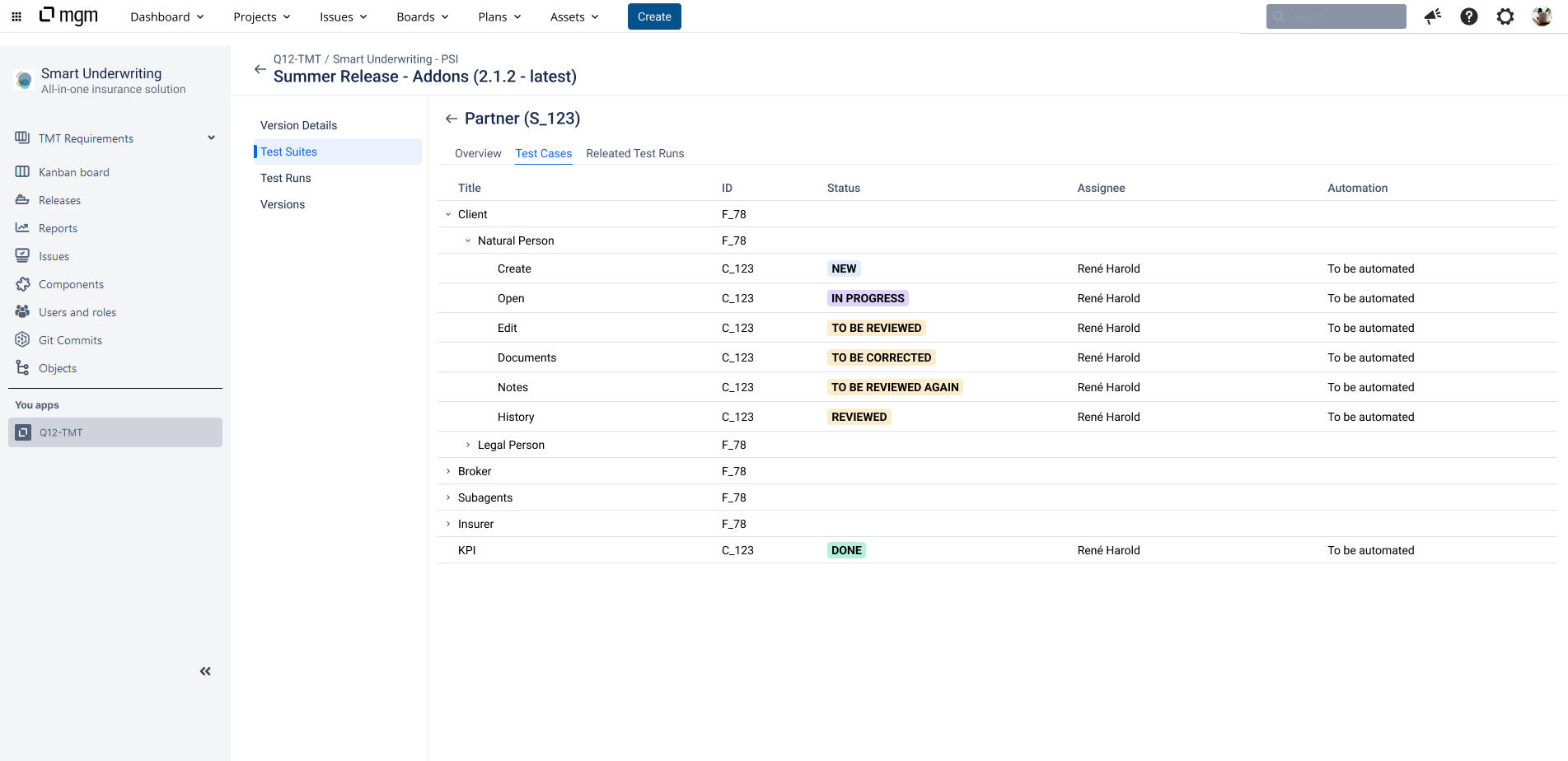
Click on a Test Case to open the Test Case details in view mode.
Click on a folder in the list to open the Folder details in view mode.
Create & Edit a folder
Click on a Folder pencil at the end of the row in the Test Case list, or click Edit in the Folder view mode. The title is a mandatory field for a folder. A description and attachments can be stored in folders.
To prevent concurrent working, some functions may be temporarily locked.