System Settings allows you to configure the Smart Panels application in regard to global settings.
Here you can decide to use the Jira built-in panels or enable Smart System Panel’s feature globally in order to customize Sub-Tasks, Issue Links, or Issues in Epic panel.
Initially, the Smart System Panels will have the same configuration as the Jira built-in panels (Sub-task, Issue Links, Issues in Epic).
But don't worry, you can customize them by:
-
enabling Smart System Panels one by one
-
editing the related template for all projects
-
granting the project administrator to the panel editor
Switch back to the default Jira built-in panels if you need, by disabling Smart System Panels one by one.
This page will show you how to enable/disable Smart System Panels globally and how to edit the corresponding template.
On this page
For all the following procedures,
-
Smart Panels for JIRA App must be installed on your JIRA server with a license or trial license (see our Installation Guide for detailed instructions).
-
You must be logged in as a user with the Jira Administrators global permission.
Enable Smart System Panels
-
Choose :cog_icon: > Manage apps
-
In the section SMART PANELS, select System Settings
-
There are three options for three System panel types: Sub-Tasks, Issue Links, and Issues in Epic panel.
Switch On: enable Smart System Panel’s feature
Switch Off: disable Smart System Panel’s feature. Using the default Jira built-in panels

The initial settings after installation of the Smart Panels for Jira app are Off for all three Smart System Panels.
Edit Smart System Panel Template
-
Choose :cog_icon: > Manage apps
-
In the section SMART PANELS, select System Settings
-
There are three options for three System panel types: Sub-Tasks, Issue Links, and Issues in Epic panel.
Click the icon :edit_icon_pen: to edit the Template to edit Smart Sub-tasks Template, Smart Issue Links Template, Smart Issues In Epic Template. -
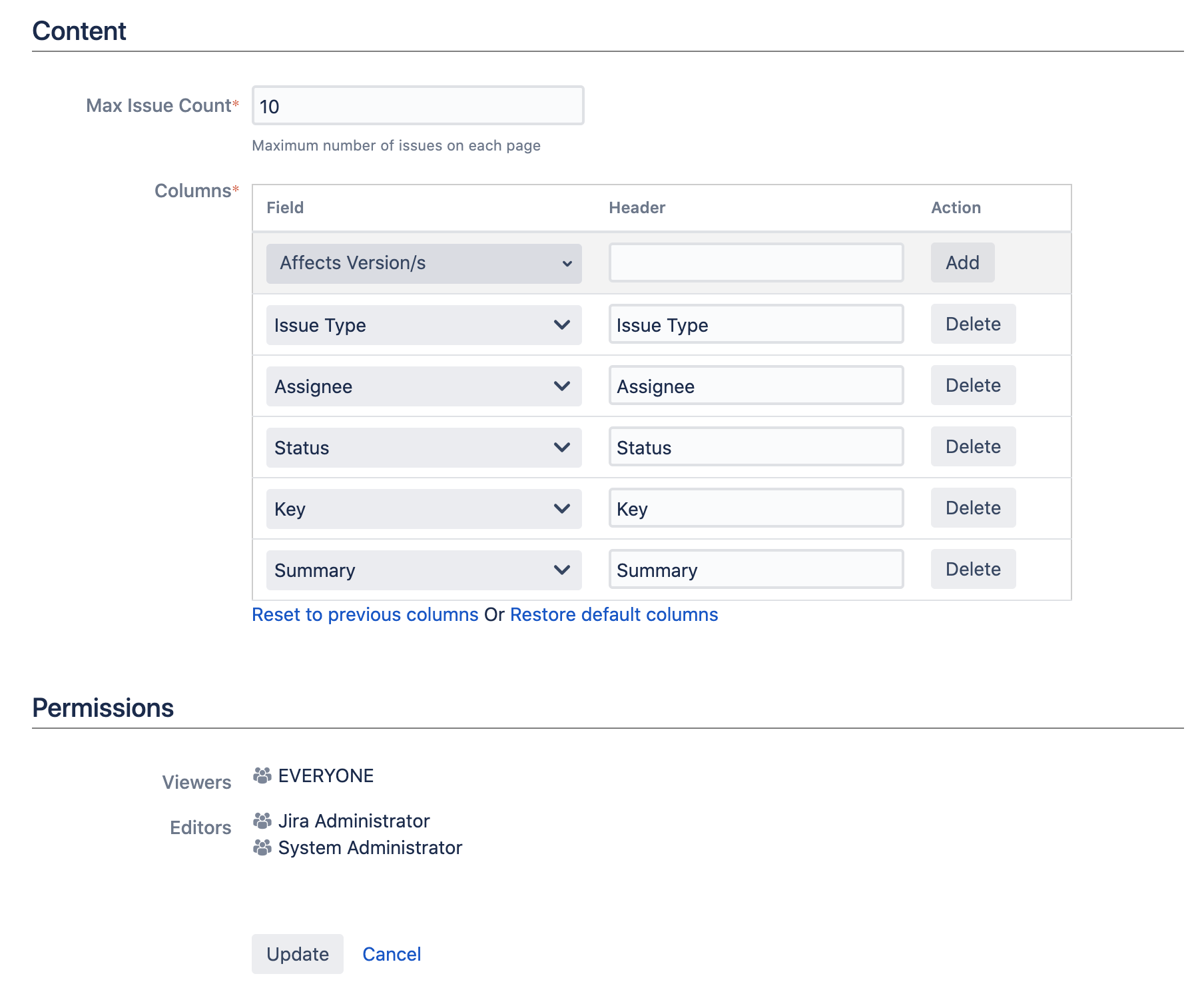
On the Edit Panel Configuration page, use the form to configure the attributes of the panel:
|
Section |
Parameter |
Description |
Additional Information |
Required |
|---|---|---|---|---|
|
Content |
Max Issue Count |
Choose the maximum issue number on one page. Use pagination to avoid overcrowded panels. |
Default: 10
|
Yes |
|
|
Columns |
Select the metadata of the issue to be displayed. Optionally customize the header. |
|
Preset |
|
Permissions |
Viewers |
Grant permission to view the panel to certain groups, project roles, etc. |
Cannot editable. The default is EVERYONE |
Preset |
|
|
Editors |
Grant permission to edit the panel. |
Cannot editable. The default is Jira Administrator and System Administrator |
Preset |
5. Click Update and you will be redirected back to the System Settings page