What you will learn here
On this page you will learn how to use “Secured User List Macro“ as a normal user
Overview
Same feature as User List Macro come from Confluence but more secured 😉.
Add the Secured User List macro to a page to display a list of Confluence users, in a particular group. The macro can also indicate when users are online or offline.
Add Secured User List Macro to your page
To add the User List macro to a page:
-
From the editor toolbar, choose Insert :add_macro_cf: > Other Macros
-
Choose Secured User List from the Reporting category.
-
Select the group you want to display.
-
Choose Insert.
You can then publish your page to see the macro in action.
Change the macro parameters
Macro parameters are used to change the behavior of a macro.
To change the macro parameters:
-
In the editor, click the macro placeholder and choose Edit.
-
Update the parameters as required then choose Insert.
Here's a list of the parameters available in this macro.
|
Parameter |
Default |
Description |
|---|---|---|
|
Group(s)
|
none |
Specify the group name. |
|
Display Online/Offline Users
|
All registered users |
List online or offline users. Leave blank to show all users, irrespective of status. Accepted values:
|
Other way to add this macro
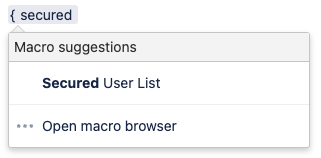
Type { followed by the start of the macro name, to see a list of macros.