
After login, the “My Projects” page opens and displays a projects tree with assigned the Projects.
Projects serve as the top‑level container for organizing and managing quality assurance work. They contain Subprojects, Test Suites, Test Cases and Test Runs.
The tree view displays the project title, ID, latest version number, version state, number of Test Suites, and for Test Runs the number of Test Runs, open and in progress versus the total number of Test Runs.
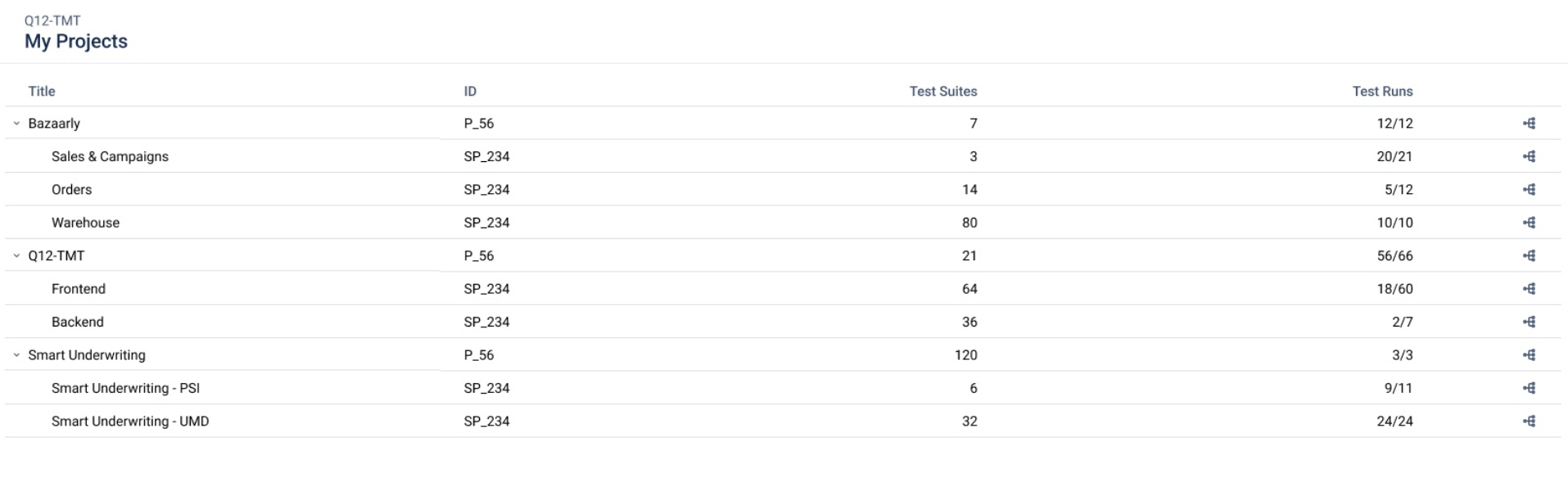
If the Project is not in the list, the user administrator can add the user to the Project or grants the required permissions.
Buttons at the end of the row:
-
Row: opens the latest Version of the Project
-
Version: opens the version tree to select another Version.
After selecting a Project and a Version, the page shows the list of all Test Suites.
Only users with the Test Manager role (or higher) can create a new Version in Q12-TMT.
This feature is currently only available in the Q12-TMT application.